skill · 11
pr-review-evidence: a desktop nobody can see
Agents can describe a change but never show it working. So give one its own screen and record it.
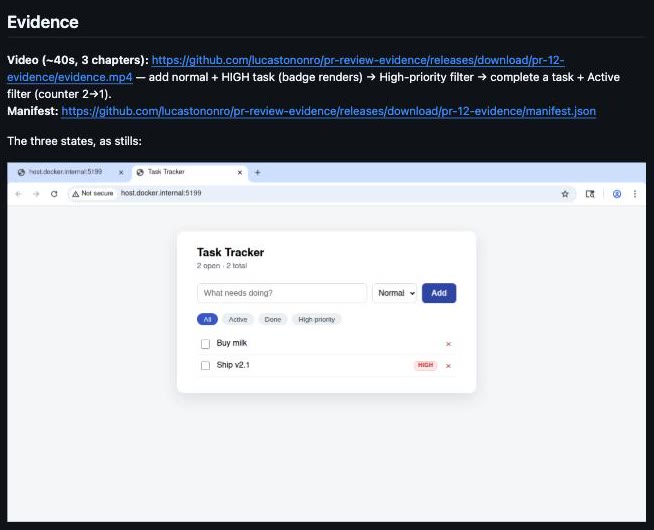
Start with the output, because the output is the argument (you'd have skipped to it anyway). This is a pull request on my own repo, and everything under the Evidence heading was produced and posted by an agent:
And this is the video it attached — 72 seconds, three chapters, served here from the same file GitHub is serving there:
Watch the cursor. It travels, it hovers, the badge renders, a filter chip highlights. That's not a screencast of a browser tab. It's a recording of a whole desktop that came into existence for seventy-two seconds inside a container. It never touched my screen.
§Why this is worth having
A good engineer does two things in a PR: describes the change, and shows it working. Agents have always been fine at the first and structurally incapable of the second, for the dull reason that they have no screen. So the second half arrived as prose — "I verified the modal comes up clean" — and I either took that on faith or opened the browser and repeated the work myself. At that point the claim had bought me nothing.
pr-review-evidence closes that specific gap. It gives an agent a real X11 desktop in a container, lets it drive the thing computer-use style, and records the framebuffer while it works. Out comes evidence.mp4, shots/*.png, and a manifest.json carrying provenance you can check against the repo. Seven bash scripts, 541 lines, and Docker.
The video is the check, not a description of one. Nothing in the loop lets the agent narrate a step it didn't take. click and type print nothing at all, so the only way it learns what happened is to take another screenshot — the same frame a reviewer ends up looking at. The chapter titles aren't authored either; they're read back out of the log of commands actually sent to the desktop. An agent using this can't tell you about a click it never looked at.
§The loop
One beat of a real session — bring up the scene, mark the chapter, look, act, look again:
evidence-start.sh                      # → live view: http://localhost:6080/vnc.html
evidence-exec.sh launch-browser http://host.docker.internal:3000
evidence-exec.sh record-start          # → recording to raw/desktop-141207.mp4
evidence-exec.sh chapter "2. Archive a task"
evidence-exec.sh screenshot            # → …/shots/shot-141219.png  ← view this
evidence-exec.sh mousemove 1042 318
evidence-exec.sh click
evidence-exec.sh screenshot archived   # → …/shots/archived.png
evidence-finalize.sh                   # → …/evidence.mp4 + manifest.json
screenshot runs scrot -o /evidence/shots/<name>.png inside the container and then prints the host path, because /evidence is a bind mount of the session directory. The agent reads the PNG off its own filesystem with the tool it already has; no image travels over a protocol. Everything else in that list prints nothing at all. mousemove, click and type are silent, so the only way to learn what happened is the next screenshot. That's the behavior I wanted.1The playbook's phrasing is "never act blind". Coordinates from an old frame are stale the moment the layout moves, and the failure mode isn't an error — it's a click that lands somewhere plausible and wrong, on video.
Session state is one file. evidence/.current-session holds an id like fix-archive-modal-20260730T141152Z: the current git branch, slugged and truncated to 40 characters, plus a UTC stamp. Every script resolves it from --session, then $EVIDENCE_SESSION, then that marker. The container is named pre-<session> and holds nothing of value, so evidence-clean.sh removes it and leaves the files behind.
There's a live noVNC view on :6080 unless you start with --no-live, in which case no ports are published at all. You don't need it. But the first time an agent takes over a desktop and starts moving a cursor with intent, you'll want to be watching!!2It's an open-format Agent Skill, not a plugin — ./install.sh --global drops symlinks into ~/.claude/skills, ~/.agents/skills, ~/.codex/skills and ~/.kimi-code/skills, which covers Claude Code, Codex, Kimi Code, Gemini CLI, Cursor, Amp and OpenCode; all of them follow symlinks. Which is exactly why lib.sh resolves its own physical directory with pwd -P before walking up three levels to find the Dockerfile — from the logical path, cd ../../.. lands in a completely different tree.
§Nothing on your screen
The first question everyone asks is whether this thing is going to start moving their cursor while they're using the laptop. It can't. The reason is structural, not a promise.
X11 input goes to a display, and xdotool is given exactly one: every command in evidence-exec.sh is docker exec -e DISPLAY=:99. Display :99 is a framebuffer Xvfb allocates in RAM inside the container, with no monitor attached to it. Your session is :0, on the other side of a container boundary. Nothing in the skill ever opens a connection to it: no -v /tmp/.X11-unix, no --net=host, no $DISPLAY passed inward. ffmpeg reads the same :99, so the recording and the input are pointed at the identical fake screen.
What does cross is one bind mount, -v "$dir:/evidence", and it carries files in one direction: the container writes PNGs and mp4s, the agent reads them off your disk. The optional noVNC view on :6080 is the only published port, and with --no-live even that isn't there.3noVNC is a viewer, not a control channel in any meaningful sense — but it is a VNC server on localhost, so --no-live is the correct default for anything you'd rather not have listening. The rest of the session works identically without it; you just can't watch.
§Recording the framebuffer
record-start execs one detached command and keeps its PID at /evidence/.ffmpeg.pid:
ffmpeg -y -loglevel error -f x11grab -video_size 1280x720 -framerate 15 -i :99.0 \
  -c:v libx264 -preset veryfast -crf 23 -pix_fmt yuv420p 'raw/$file'
:99.0 is the display the entrypoint brings up as Xvfb :99 -screen 0 1280x720x24 — which is why the same resolution appears in two files and must not drift. Recording starts on demand rather than in the entrypoint, so an idle session costs nothing.
Grabbing the framebuffer is the whole difference. A browser-automation screencast records a page: no cursor, because there is no cursor, and nothing outside the viewport exists. x11grab records whatever was composited into the screen — the software cursor Xvfb draws, native menus, an xterm, a GTK dialog, and any window you forgot was open. Real time at 15 fps also means the video's clock is the agent's clock, so a pause while it was thinking is a pause on screen.
That generality is the point, and the repo heads off the objection you're forming:
# The base image is used ONLY for its preinstalled Chromium and system
# libraries — nothing here drives Playwright; input is 100% xdotool.
FROM mcr.microsoft.com/playwright:v1.55.0-noble
launch-browser really does just glob /ms-playwright/chromium-*/chrome-linux/chrome and run the binary with --no-sandbox. Then it spends up to ten seconds polling xdotool search --onlyvisible --class chrom to force the window to 1280x720, because --start-maximized is unreliable under openbox and a browser that opens at the wrong size ruins the take.
§Pacing for a reviewer
The best file in the repo is references/recording-playbook.md, and it exists because of a failure I hadn't anticipated: an agent will produce a recording that is entirely correct and unwatchable. Nothing for twelve seconds, then everything at once, cursor teleporting between coordinates.
So the playbook is mostly about time. Aim for 20–90 seconds and 3–7 chapters, because "a reviewer gives you about a minute". Move the mouse toward a target in two or three steps instead of jumping, since the glide is what makes it read as a person. Linger about two seconds on each result so it can actually be read. A sleep 1 on the host after navigation is a natural pause in the video for free. Number the chapters, because reviewers write "chapter 3" in comments. Don't record spinners or deploy waits. Don't ship a first take with a visible stumble at 0:05 — clean and start over.
type is xdotool type --delay 80, slow on purpose so keystrokes are visible; troubleshooting explains how to speed it up to 15 ms and the playbook tells you not to bother for short strings. And the chapter card is zenity --info --no-wrap --timeout 2: a GTK dialog drawn on the desktop, which ends up in the video because everything on the desktop ends up in the video. No overlay, no compositing pass, no burn-in step.
§The manifest
finalize stops the recorder, concatenates the raw segments if record-start ran more than once, probes the duration, warns if it comes back under two seconds4Which catches my favorite bug. Under colima, $HOME is shared with the VM but /tmp isn't, so running a session from an unshared path bind-mounts an empty directory in total silence and every capture stays trapped inside the container. It looks exactly like a broken recorder., and writes the one file a publisher is meant to read. This isn't an illustration — it's the manifest published on PR #12, trimmed only of whitespace:
{
  "schema": "pr-review-evidence/1",
  "session": "task-priorities-20260730T144730Z",
  "created_at": "2026-07-30T14:56:56Z",
  "capture": { "mode": "desktop", "display": "1280x720", "recorder": "ffmpeg x11grab" },
  "video": { "file": "evidence.mp4", "duration_s": 72, "size_bytes": 172715 },
  "source": {
    "repo": "https://github.com/lucastononro/pr-review-evidence.git",
    "branch": "examples/task-priorities",
    "commit": "fb739417404fbb35755afc9afaccc8dffef8c463",
    "pr_url": "https://github.com/lucastononro/pr-review-evidence/pull/12"
  },
  "agent": { "harness": "kimi-code", "model": "kimi-k2" },
  "chapters": ["1. Add a normal task, then a HIGH one", "2. NEW: High priority filter",
               "3. Complete a task, filter Active"]
}
The two halves aren't equally trustworthy. source is read on the host at finalize time — git remote get-url origin, git branch --show-current, git rev-parse HEAD, gh pr view --json url — so anyone can check that commit against the repo. agent is ${EVIDENCE_HARNESS:-unknown} and ${EVIDENCE_MODEL:-unknown}: self-declared, and unknown unless the harness exported them. Kimi Code did, which is why that run names itself. Nothing verified it. Read that field as a claim, not a measurement.
chapters is the nicest part and the least designed. It isn't authored anywhere: finalize greps actions.jsonl for "cmd":"chapter and reads the titles back out of the log of what was actually sent to the desktop. The chapter list can't disagree with what appeared on screen. Same instinct as the rest of the skill — derive the description from the thing that happened, don't ask the agent to narrate it.
§The endpoint that doesn't exist
Having a video on disk isn't the same as having it in the pull request. This is where the project spent the most time being wrong.
GitHub has no API for attachments. None. The drag-and-drop box under a PR comment posts to an internal endpoint that wants browser session cookies; there is no gh api call for it, and there never has been. So an agent holding an authenticated gh and a 2 MB mp4 has no supported way to put the second thing inside the first. In 2026.
The workaround the skill settles on comes from mrshu's gh-pr-image: release assets are the only fully-CLI upload whose URLs render for anyone with repo access. One prerelease per PR, tagged from the PR number:
tag="pr-${pr:-$(date -u +%Y%m%dT%H%M%SZ)}-evidence"
gh release view "$tag" --repo "$repo" >/dev/null 2>&1 \
  || gh release create "$tag" --repo "$repo" --prerelease \
       --title "Evidence ($tag)" --notes "Uploaded by the pr-review-evidence skill."
gh release upload "$tag" "${files[@]}" --repo "$repo" --clobber
Then it prints PR-ready markdown against https://github.com/$repo/releases/download/$tag/ — a bare link for evidence.mp4, <img src=… width="800"> for each still, list items for each logs/*.log. The agent pastes that into the PR body. Access control is the repository's own permissions, which is the entire appeal: nothing to host, nothing to expire, no password to leak, and --clobber makes a re-record idempotent. The cleanup one-liner goes to stderr as an HTML comment so it lands in the PR body but not in the rendered text.5pr-12-evidence is derived from gh pr view --json number, so it only works from a branch with an open PR; outside one it falls back to a UTC timestamp, which uploads fine and is harder to find later. Deleting the PR's evidence is gh release delete pr-12-evidence --cleanup-tag --yes.
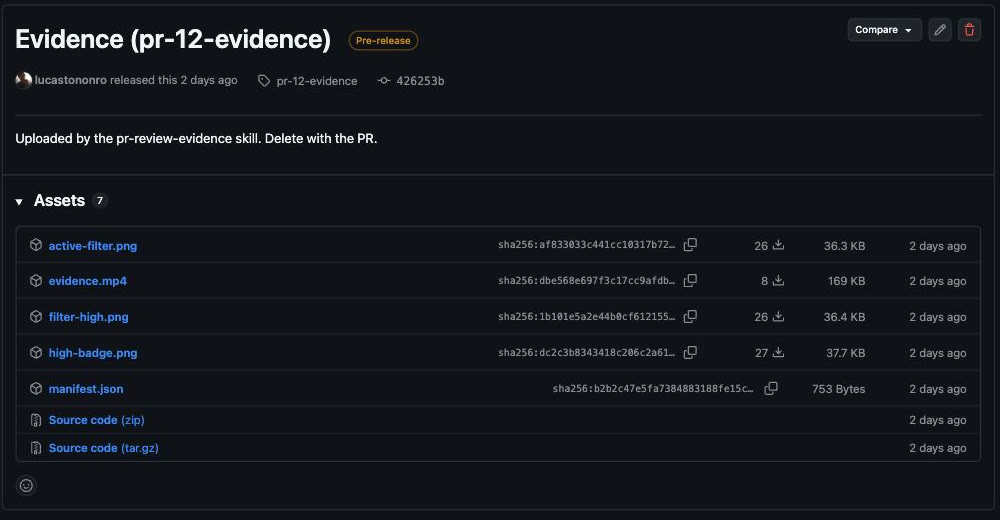
That is the whole storage layer — a prerelease nobody will ever install, holding 280 KB of evidence, deleted when the PR is.
I know release assets are the right answer because I shipped the wrong one first. Version 1.0.0 had a Cloudflare Worker with R2 behind it — then Workers KV, once R2 declined to store a single byte without a credit card on file — serving password-gated links. PR #7 deleted the whole thing. The links never expired. The password traveled in the URL — a password, in a URL. Revoking one session meant rotating the admin token for all of them. Publishing is bring-your-own now, and the default has no moving parts.
§Replaying the examples
The repo contains three small apps under examples/ whose only job is to be something to record: demo-webpage (a greeting card and a counter), launch-checklist (tick items, watch a progress bar fill), and task-tracker (a small Vite SPA). Every feature added to them landed as a real PR with evidence attached by the skill, so the examples are readable rather than described — the merged PRs are the documentation.
PR #12, the one at the top of this post, is the one I'd read in full. Its three chapters were read back out of the action log rather than typed: "1. Add a normal task, then a HIGH one", "2. NEW: High priority filter", "3. Complete a task, filter Active". Three deliberately named stills — high-badge.png, filter-high.png, active-filter.png — and the manifest beside them. The body also names the local session, evidence/task-priorities-20260730T144730Z/, which is the branch slug and the UTC stamp doing their job.
One discrepancy in that screenshot makes the case better than I can: the body says "40s" and the manifest says 40s" is me, typing an estimate into a text box. Guess which number I'd trust in a review."duration_s": 72. The manifest was derived with ffprobe from the actual file. The "
That PR also carries a one-line change to vite.config.ts adding allowedHosts, because the dev server refused requests with a host.docker.internal Host header. It's the container seam biting in the most ordinary way possible. I like that it's in the diff rather than in a troubleshooting page.
The older ones are worth a look for a less flattering reason. #1, #5 and #9 were recorded in the browser mode that #10 then deleted — CDP screencasts with no cursor and teleporting actions. Put #5 next to #12 and the argument for grabbing a framebuffer makes itself. One reads as a slideshow of correct states; the other, as somebody using an app.
And not all evidence is visual. #13 added evidence-log.sh, which runs a command on the host and captures stdout, stderr and the exit code into logs/<name>.log:
evidence-log.sh api-health curl -s http://localhost:3000/health
evidence-log.sh e2e-tests npm test
It works inside a visual session, and standalone with no session and no Docker at all — finalize then writes "video": null with "capture": {"mode": "logs"}, and the uploader ships the log files with markdown links beside the stills. Some changes are proved by an exit code, and pretending otherwise would mean recording a video of a terminal.
§What generalizes, and what doesn't
The transferable idea is duller than the desktop, and it's the manifest, not the video: keep host-checkable provenance apart from self-declared fields instead of averaging them into one blob a reader has to trust wholesale. source comes from git and gh on your machine; agent is whatever the harness said about itself. Any tool emitting machine-generated evidence has that same split to make. Most of them quietly don't.
The limits, plainly: a recording shows one path through a UI, and a well-paced one can conceal as much as it proves. Read uncharitably, the playbook's pacing advice is advice on making a demo look good. A recording tells you the modal opened this once, on this commit, for this agent. That's much more than prose and much less than a test suite.
§What's left, and the invitation
Short list, in the order I'd do it:
- Auto-fill
agent.harnessandagent.modelso the manifest stops sayingunknownunless someone remembered two env vars. - One place for the display geometry.
1280x720is currently written in the entrypoint and again in the ffmpeg line, and nothing stops them drifting. - Windows and Linux hosts. In theory it just works — it's Docker plus a bind mount — but it's only tested on macOS.
That's the whole roadmap. Better short than invented.
The repo is github.com/lucastononro/pr-review-evidence — MIT, seven bash scripts, one Dockerfile. Feedback and PRs welcome. Or just lift the scripts and use them for something else, if that's easier — nothing in here is clever enough to deserve being a dependency. If you record something with it, put the evidence in the PR. That's the point.
Tests tell you the logic holds; they say nothing about whether the modal opens behind the header.
Comments
Sign in with GitHub and say something. Threads live in this repository's Discussions, so you keep your words and I keep no database.